 Oracle Limitations
The General Setup
A cost that you don’t pay for
Setting up the
Virtual Machine,
Storage, and Network
Oracle Limitations
The General Setup
A cost that you don’t pay for
Setting up the
Virtual Machine,
Storage, and NetworkNext > |
Everything for Free Oracle Limitations
The General Setup
A cost that you don’t pay for
Setting up the
Virtual Machine,
Storage, and Network
During 2024 and 2025, I created songs using Udio and Suno AI, sharing them on YouTube. To play these tracks randomly on a 24/7 station, I sought the best free radio software and found Azuracast.
I didn’t want to host this software on my home PC, as I am a guy who shuts down the internet router overnight. 😊 So I started to look for a free VPS (Virtual Private Server) or a free VM (Virtual Machine), and there are not many out there.
• Microsoft and Google offer only short-lived free trials.
• Oracle provides a perpetual (?) Free Tier — if you use “Always Free eligible” services.
One of the problems that I faced was that I was (and still am) a beginner in Linux server. But nowadays we can ask ChatGPT anything, including this tech stuff. So I started chatting online, gained some information, and learned some Linux server skills. At first, I had total confidence in what it told me and applied that immediately, but that led to chaos in my VM, so I had to terminate it and start anew. Then I switched to Gemini chat, which seems more appropriate to my endeavour. Probably because ChatGPT wasn't trained on YouTube data, while Google's Gemini was.
The lesson that I learned is „never trust AI, just use its information smartly”. I learned the hard way, through error and retry. AI has a lot of information, but zero responsibility. Moreover, especially in the IT field, there is a lot of outdated information that AI will pass to you. And sometimes, if it doesn’t know something, it even hallucinates confidently! Be prepared for all kinds of such surprises.
Still, AI is the cheapest tutor you can find out there, with all its flaws. But never let it make decisions in your place! One day it will ruin everything you’ve built together...
The documentation that you are reading now was made out of my sweat and tears. In fact, I’ve written it for my own use, as I will probably have to reference it later, when I will have probably forgotten all this complex stuff (I am 60 years old 😊).
Yet, the software is constantly updating and upgrading, and nobody can guarantee that this documentation will not be deprecated over a decade, or even sooner...

Understandably, Oracle has put some boundaries on its free offer. In fact, their offer has shrunk over the years because of the huge demand for free servers. Who knows if it will be available next year anymore?!
So, there are some minimal limits for the "Free Tier". And as for the "Always free", you can only get a limited storage space and memory without paying anything. You cannot use this VM for AI training, just for other purposes — for example, as a radio or web server.
The Oracle Idle Policy is intended to detect the VMs that are not used enough and should return to the general resource pool. This is very important for you to maintain your server active and running for an unlimited (?) amount of time. The main threat to your Free Tier VM is Oracle's idle instance reclamation policy. If your VM has very low CPU, network, and memory utilization for a continuous 7-day period, Oracle may reclaim it.
Some people say that these conditions should be met simultaneously, while others argue that Oracle's policy is designed to reclaim truly unused resources, not those that are just low on one metric but active on another. For example, a VM with very low CPU utilization might still be actively used if it's processing a lot of network traffic.
To be totally assured, you should definitely use your CPU over the threshold of 20% AND have more than 20% network traffic. (For Ampere shapes, the VM's memory should use more than 20%, too.)
But if your project is using low resources that may not reach those two thresholds, what to do? You can learn some tricks in the chapter "Keep Your VM from Being Reclaimed as Idle by Oracle".
UPDATE: This documentation and project implementation took place initially in August-September 2025. Then, in October 2025 Oracle introduced a new limitation affecting Free Tier VMs. Review the last requirements in the following chapter Update (October 2025)
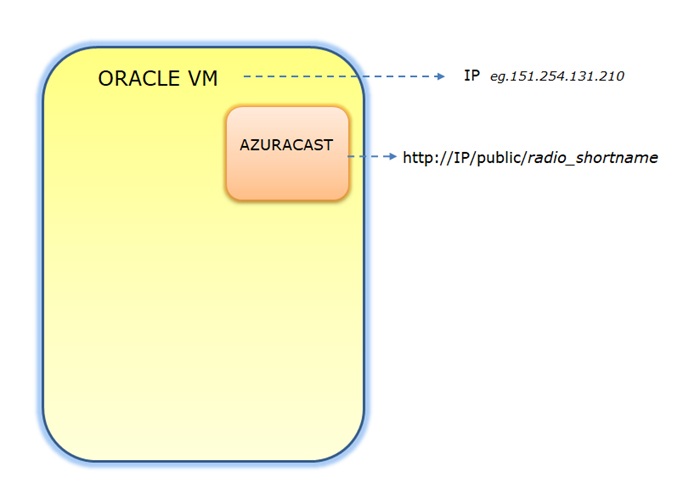
I created my first Oracle Virtual Machine and got its dedicated IP. I then installed Azuracast software for my radio station.
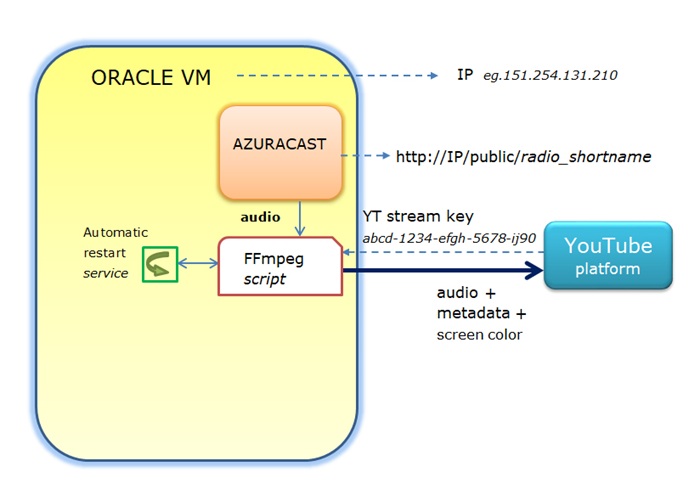
To increase my YouTube channel audience, I made an FFmpeg script that sends the audio signal to the YouTube streaming platform. Of course, it also increases the CPU usage.
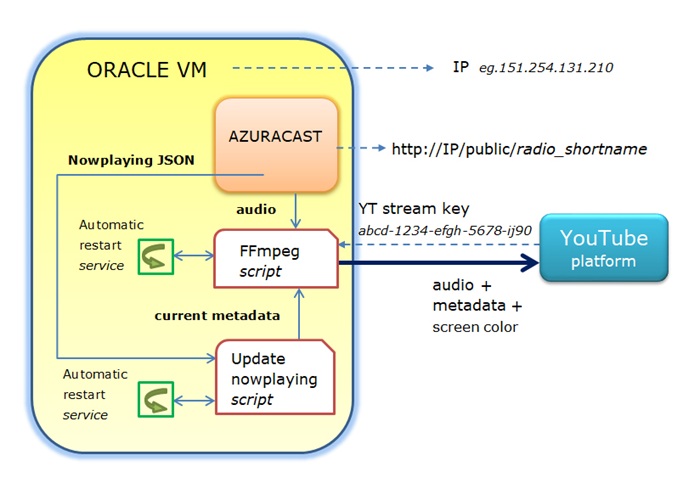
To enrich the information offered by YouTube for the current playing song, I made another script to send the metadata of the current song (author, title, album, genre) alongside the main audio signal.
Listen to my YouTube live stream: youtube.com/@spiritus.romania/streams
After creating the Oracle Free Tier account, install the Oracle Authentication app via Google Play or App Store, so you can log in.

As a safeguard, you can go to the Billing & Cost Management section of your Oracle cloud account (in the left side menu).
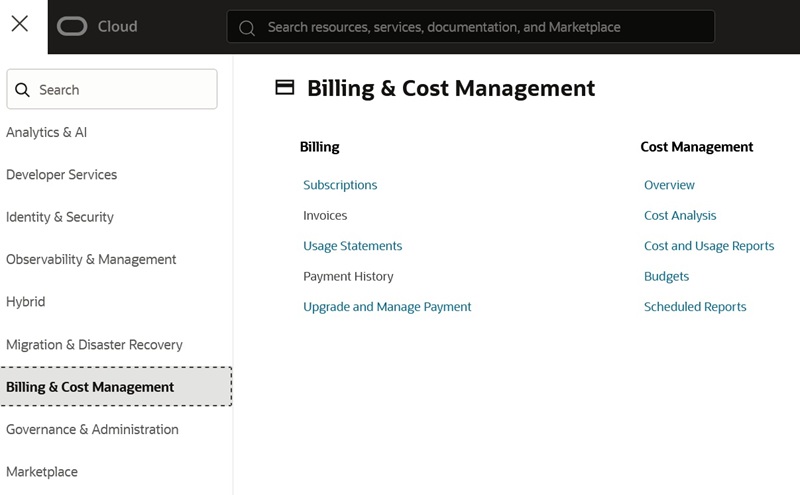
Set a notification to receive an email if your server has consumed more than is allowed by the "Always Free" services (set the limit to 1% of $1).
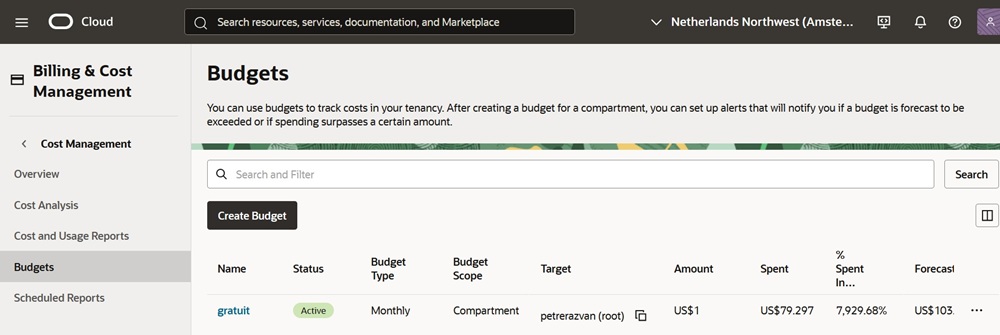
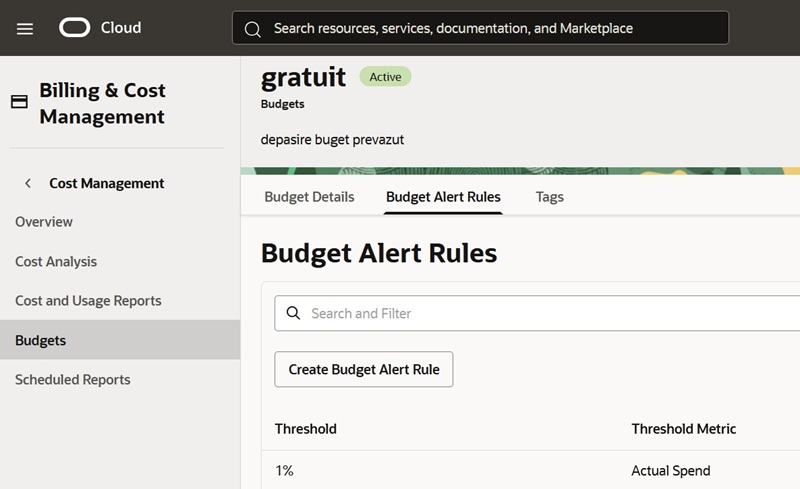
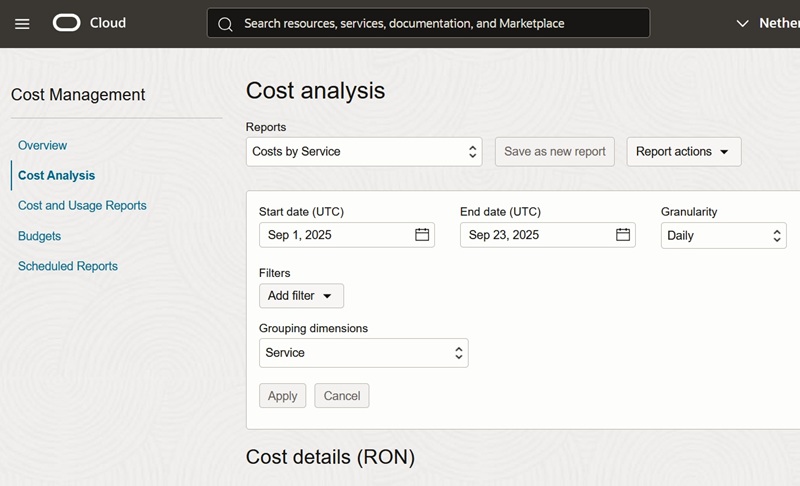
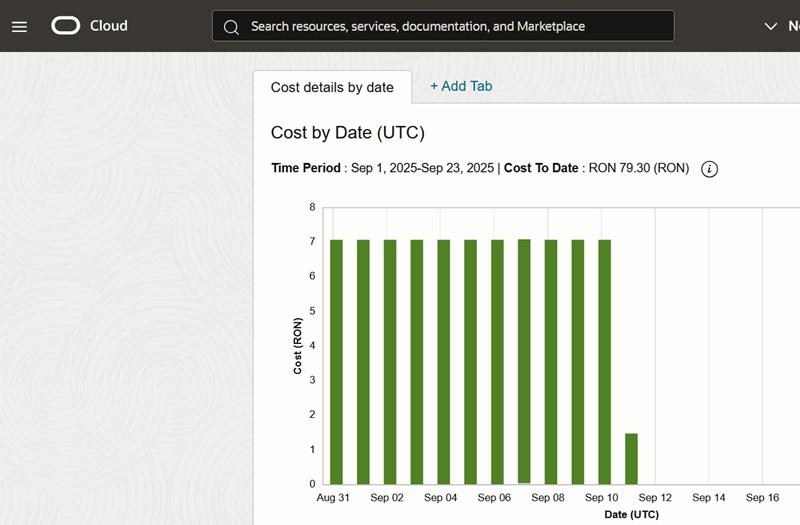
Do not panic if you see in the Cost analysis section that every day of Oracle services costs you an amount of money, as the invoice will be automatically credited (deleted) by Oracle at the end of the month (if you use "Always Free" resources within the given limits!). Nevertheless, it’s good to know the value of the gift Oracle offers you! 😊
UPDATE (October 2025): It is highly recommended to upgrade from the "Free Tier" to the "Pay As You Go" plan. Essentially, the "Always free" services will stay free, so you won't have to pay anything — if you don’t exceed the limits of those free services. Yet, if Oracle considers it necessary, they might send you a notification through your email that you are not using enough resources. Thereby, it is best to have ready-made solutions against their Idle Policy, which I've fully covered in this tutorial. See how to Keep Your VM from Being Reclaimed as Idle chapter.
If you open an Oracle account and do nothing with it, the Free Tier will simply terminate after 60 days, but your account will remain active, and you can opt for a Free Tier again.
If you open a Free Tier account and create a Virtual Machine, your VM instance will be terminated after 60 days without any explanation from Oracle — 30 trial-days, plus another 30 days. Still, other services like Storage: block volume, Network: vcn, Object storage: bucket; Storage: boot volume backup, will be detached from the VM and may be re-used within the same Free Tier — arguably, for 30 days.
Of course, you can make another VM later and recover from backups, or start from scratch again. Follow this full step-by-step tutorial, and you can deploy your project in a very short time, simply copying/pasting the Linux commands.
Just to be clear, during a 2-month period, I created at least:
I've gained a lot of knowledge and experience from all my trials and errors, which I am sharing with you. It was and continues to be an IT adventure that I've never thought I would experience.
I covered the following steps in my introductory video, but I'll add some points here.
- First, you have to get a Free Tier Oracle account. I couldn't get that on my first attempt, but the next day I was successful. Probably, the demand for free servers was way too high.
-
Secondly, I created my first VM (Virtual Machine), and I had to choose between
AMD, Intel, and Ampere shapes (as of August 2025).
At first, I chose Ampere, but a message came at the final stage that said it is
not available at that moment. I then turned to an Intel CPU (VM.Standard3.Flex),
which was available for the Free Tier.
- When you create your first VM, at one point, you have to choose the size of the Boot volume (by default, it is 50 GB). I made it 100 GB. You also create a Virtual Cloud Network that gives you a dedicated IP.
As I said earlier, while chatting with ChatGPT and experimenting with all sorts of Linux commands, I ended up ruining my first VM and ultimately had to replace it. So, I terminated that instance and then created a new one.
When you terminate a VM, the Virtual Network automatically detaches from it and is kept intact in the “Always free” offer. So, when creating the second VM, I chose the same VCN as before.
Yet, when I terminated my first VM, I did not tick the "delete the attached boot volume" option, and the Boot volume remained intact and detached. I was unaware that, by creating a new Boot volume with the same size, I already used a total of 100 GB + 100 GB = 200 GB. That is the maximal limit within the "Always Free" offer. Anything that goes beyond that threshold has to be paid for.
So, later on, I went to the Storage tab and terminated the first Boot volume. Now I was safe to go further without paying for extra storage, as I had another free 100 GB still unused.
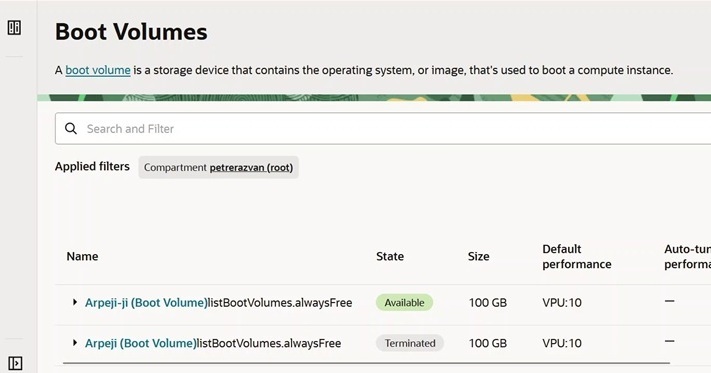
Oracle Cloud's Free Tier offers two types of block volumes for free:
• Boot Volume: Every VM instance you create comes with a Boot volume, which is where your operating system (Ubuntu, in my case) is installed.
• Block Volume: This is an additional volume you can attach to your VM to expand its storage.
I attached another 50 GB of Block volume to my VM and dedicated it to my Azuracast backup in case of reinstalling the program. Of course, it could also be used for any other purposes. Read how to "Create and attach a block volume".
Whether you use it or not, Oracle offers an "Always Free" 20 GB for Object Storage, which is separate from the Block volumes. If you back up your whole VM system, it automatically eats up from this storage quota.
In this case, keep in mind not to create another 'bucket' as an Object Storage, because you can easily exceed that 20 GB quota and have to pay for anything that goes beyond.
Then, verify in the 'Boot Volumes backups' the size of your file. For example, my VM backup (incremental) file was 13 GB, which is under the "free" limit of 20 GB.
Note: If I could, I would have chosen the other way round, i.e., the 50 GB block volume for the VM backup and the 20 GB bucket for the AzuraCast backup (in direct proportion to their size), but that's how things are…
As a matter of fact, you may also make no backup for the VM and download the AzuraCast backup to your home PC.
The main worry in the first steps is to correctly configure the system so that you will not pay anything at the end of the month.
"Always Free" thresholds:
- Block volumes: Maximum 200 GB (Boot + Block).
- Object Storage: Maximum 20 GB (monitor the size of the Boot volume backup file!).
- Network bandwidth: Unlikely to exceed limit.
*
To not be flagged as idle and your VM not be terminated, the minimal thresholds (for the "Free Tier" especially) are:
- CPU usage: At least 20%.
- Network traffic: At least 20%.
- Memory: At least 20% (Ampere shapes only).
You can check all these volumes in the left side menu of the Oracle account, in the Storage tab.
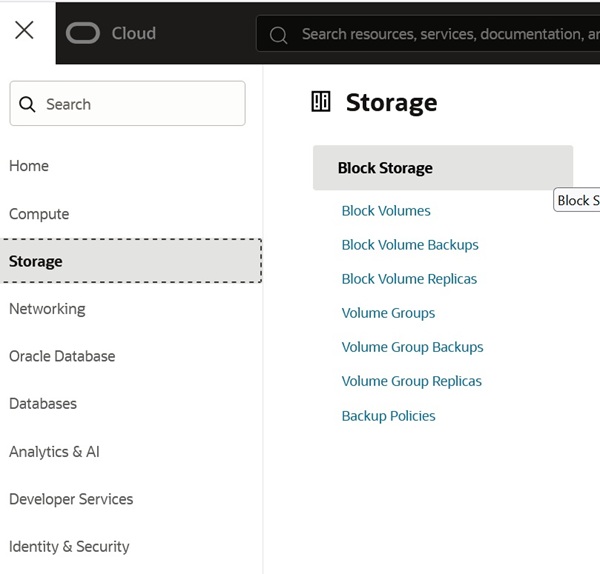
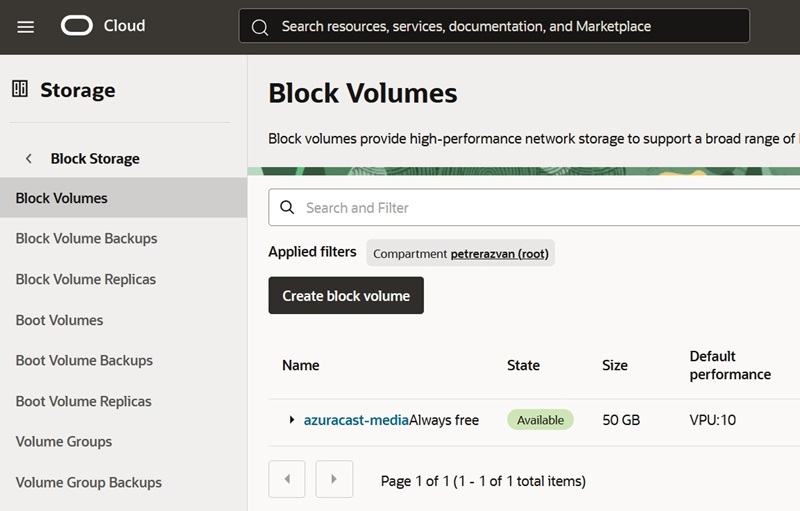
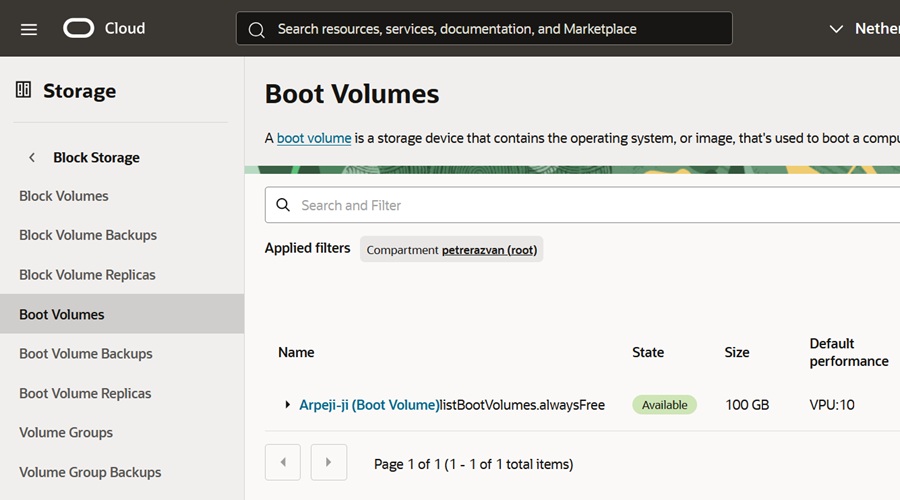
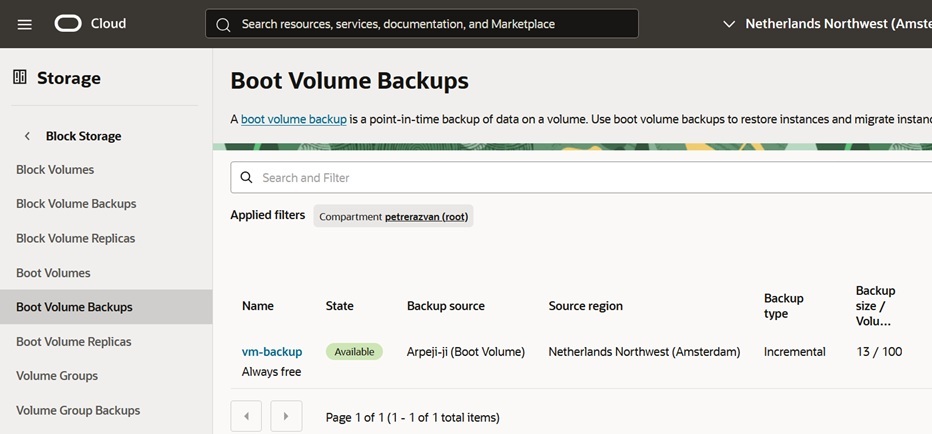
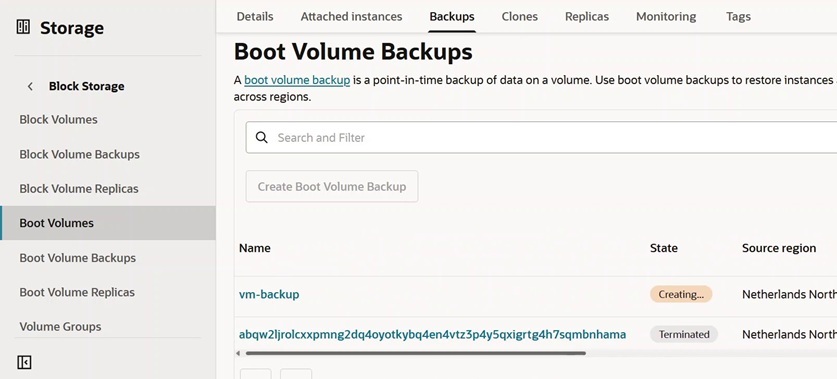
Important: If you are planning to make another manual VM backup, first terminate the older backup file, so you don't exceed the 20 GB limit. See the screenshot below.
Next chapter: Update (October 2025) >